So funktioniert Green Bridge
Kurze, einfache Erklärungen dazu, was Sie mit Green Bridge tun können, viele mit Video. Wählen Sie, wer Sie sind und welche Plattform Sie nutzen, oder suchen Sie.
349 Anleitungen, 277 mit Video
Gefundene Anleitungen: 347 Filter zurücksetzen
-
 0:54
Can I pay for my child's premium in US dollars?
Yes. If your child's request is priced in US dollars, the link we email you shows the price in dollars. Click the Pay button and pay with a card on the secure checkout page. When you're back on Green Bridge, your child has premium and you both get a confirmation email.
Premium für ein Kind bezahlen
-
 1:22
How to verify your ID as a Network teacher
Once your profile is approved, open Teachers' Network and go to Verify your ID. Choose Automatic check, tick the consent box and click Start my ID check. Our ID partner asks you to photograph your passport or ID card and take a short selfie, turning your head left and right. When you come back, you'll see "Your ID is verified. Thank you."
Den Ausweis einer Lehrkraft prüfen
-
 0:53
How to finish an ID check you didn't complete
If you leave the ID check before the end, nothing is lost. Open Verify your ID again and you'll see your check waiting. Click Open the ID check again to carry on where you left off, or Start a new ID check to begin again.
Den Ausweis einer Lehrkraft prüfen
-
 1:04
How to switch to a manual ID check part-way through
If the automatic check isn't working for you, for example you have no camera to hand, go back to Verify your ID and click Use manual review instead. Choose your country and document, upload a photo of it, give the last four characters of its number and click Send for checking. A person on our team reviews it and emails you.
Den Ausweis einer Lehrkraft prüfen
-
 0:53
Can someone check my ID by hand instead?
Yes. Under Verify your ID, choose Manual review by our team, or click Use manual review instead. Pick your country and type of document, add a clear photo of it and the last four characters of its number, then click Send for checking. Our team usually emails you within 2 working days. NIN slips, voter's cards and other government photo IDs are accepted here.
Den Ausweis einer Lehrkraft prüfen
-
 2:42
How to apply to teach on the Teachers' Network
Sign in and open Teachers' Network from the menu. The application asks one question at a time: who you are, where and how you teach, your subjects, year groups, exams and languages, and when you're free. Then write a headline and short profile, add a photo, and give your qualifications, safeguarding answers and contact details. Choose who can find you, agree to the terms and click Submit my profile. We'll review it.
Bewerbung für das Lehrkräftenetzwerk
-
 0:37
How to search for a teacher by subject
On the Find a teacher you can trust page, type a subject in Search teachers, for example Mathematics, and search. You can also search by name, specialism or city. Each teacher shows a short headline about how they teach. Click one to open their profile. Their phone number and email are not shown on it.
Nach einer Lehrkraft suchen
-
 0:25
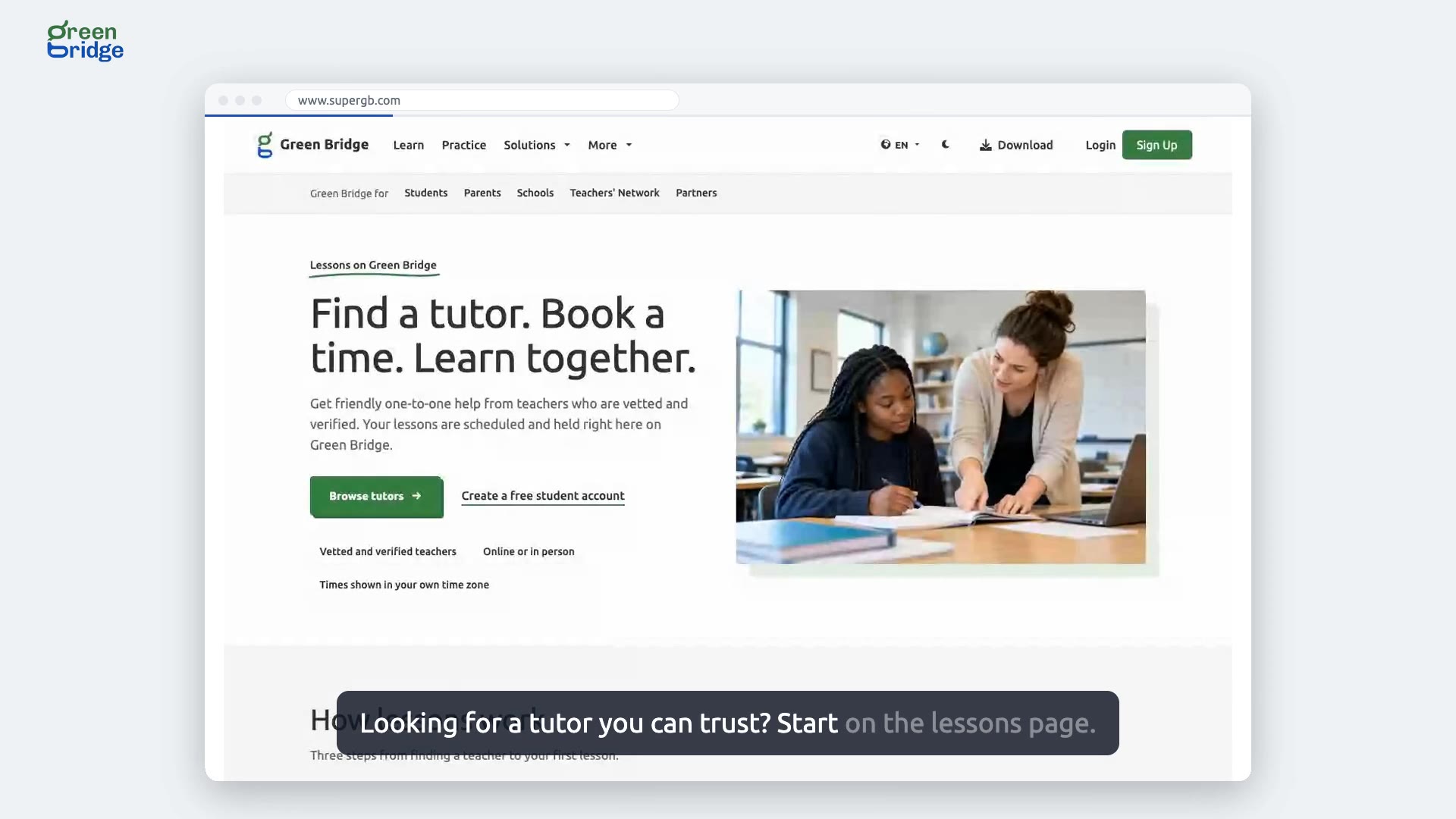
How do lessons with a tutor work?
The lessons page sets it out in three steps. Find a tutor by subject, exam and level, then book a free slot from their week, shown in your own time zone. When it's time, open the lesson room in your browser for video, sound and a shared screen, with nothing to install. Parents approve the teacher before lessons start and see every booking. Teachers can join the Teachers' Network to run their own lessons there.
Unterricht bei einer Nachhilfelehrkraft
-
 1:29
How to propose a lesson time to your student
Click Teachers' Network in the menu and go to Lessons. Under Book a lesson, choose the learner, the length and one of your free start times, add what the lesson is about if you like, and click Propose this time. Your student accepts it from My teachers on their Find a teacher page, and the lesson then shows as Confirmed.
Unterrichten im Lehrkräftenetzwerk
-
 2:04
How to set homework for your student and see what they hand in
Open Lesson desk, choose the Homework tab and click New homework. Give it a title and click Save details. Add questions from the Green Bridge bank, or write your own: for multiple choice, type the options, mark the right answer and click Save question. Under Set for, tick your student and click Set homework. They find it in Teacher notes and click Hand in, and their work appears under Handed in.
Unterrichten im Lehrkräftenetzwerk
-
 1:20
How to ask a teacher on the Teachers' Network to teach you
Sign in, open Find a teacher and choose a teacher to see their profile. Pick what you'd like help with, such as preparing for your exams, and click Ask to connect. You'll see that your request has been sent. Once the teacher accepts, they appear under My teachers.
Unterrichten im Lehrkräftenetzwerk
-
 1:09
How to decline a student who asks you to teach them
Click Teachers' Network in the menu. New requests appear under Students who want to connect, marked Waiting for your answer. Click Decline and confirm. The student sees that you can't take them on, and they can ask again after 30 days.
Unterrichten im Lehrkräftenetzwerk
-
 1:24
How to see a student's practice results, or stop teaching them
Students decide whether you see their results: in Find a teacher, under My teachers, they tick the box that lets you see their practice results. On your Teachers' Network page, click Practice results next to them to see how ready they are and which topics to work on, but not their answers. To stop teaching someone, click End connection and confirm. They no longer see you under My teachers.
Unterrichten im Lehrkräftenetzwerk
-
 2:27
How to mark written homework and close it
For written work, set a question of the type Written answer and say what a good answer covers. Once your student hands it in, open Lesson desk, choose the Homework tab and pick the homework. Open their answer under Handed in, enter the marks and a comment for the learner, and click Save marks. When everyone is done, click Close homework and confirm. Anyone who hasn't handed it in can no longer do so.
Unterrichten im Lehrkräftenetzwerk
-
 0:42
How to decline a lesson a student asked for
Click Teachers' Network in the menu and scroll to Lessons. Lessons students have asked for are listed under Waiting for your answer. Click Decline on the one that doesn't suit you and it leaves the list. If another time would work, you can offer it from Book a lesson on the same page.
Unterrichten im Lehrkräftenetzwerk
-
 1:17
How to move, make free or cancel a booked lesson
Click Teachers' Network in the menu and find the lesson under Upcoming. Click Change time, pick a new slot and click Propose new time. The lesson then waits for your student to accept. Make this lesson free removes the charge, and if it was already paid for, the payment is refunded in full. To call it off, click Cancel, then Yes, cancel it.
Unterrichten im Lehrkräftenetzwerk
-
 0:52
How to change your price per hour
Click Teachers' Network in the menu and find Getting paid. Click Change next to Your price, type the new price for one hour and click Save. Shorter and longer lessons are priced in proportion, so a 30-minute lesson costs half. The price has to be within the range shown under the box.
Unterrichten im Lehrkräftenetzwerk
-
 0:52
How to add time off when you're away from teaching
Click Teachers' Network in the menu on the left. Under Your teaching hours, click Add time off, then Add a period. Pick the first and last day you're away and click Continue. Your hours now show when you're away, and nobody can book a lesson with you in that time.
Unterrichten im Lehrkräftenetzwerk
-
 1:04
Can I leave the Teachers' Network and come back later?
Yes. Click Teachers' Network in the menu, then Leave the Network, choose what is making you leave, click Continue, tick that you understand and click Leave the Network. Your upcoming lessons are cancelled and your profile comes off Find a teacher, but your answers and documents are kept. When you're ready, click Rejoin the Network and your application opens for you to finish. If you only need a break, add time off instead.
Unterrichten im Lehrkräftenetzwerk
-
 0:53
How to change the hours you teach each week
Click Teachers' Network in the menu. Under Your teaching hours, click Change hours. Click Clear to empty the old week, choose a pattern such as Weekends, Weekday evenings or School hours, and click Continue. Students can book lessons with you only in the hours shown.
Unterrichten im Lehrkräftenetzwerk
-
 1:09
How to change the bank account your lesson pay goes into
Click Teachers' Network in the menu and find Getting paid. Click Change next to Paid into, choose your bank, enter the account number and click Check account, then make sure the name shown is yours. Click Email me a code, type the code from the email and click Save payout details. The code works for 15 minutes. For your safety, payments can pause for a short time after your details change.
Unterrichten im Lehrkräftenetzwerk
-
 0:48
How to join a lesson's video call as a teacher
The lesson room opens 10 minutes before the start. Click Teachers' Network in the menu, find the lesson under Lessons and click Join lesson. The room opens in a new tab: click Join now and you're in the call. If your camera or microphone doesn't start, check that the page is allowed to use them.
Unterrichten im Lehrkräftenetzwerk
-
 1:00
How to pay for a lesson from the link in your email
When a teacher who charges accepts your lesson, we email you a link to pay for it. Open the link, check the amount and click Pay, then finish paying on the secure payment page. You'll come back to Green Bridge and see "Thank you, your payment is in". Pay at least an hour before the lesson starts, because unpaid lessons are cancelled then.
Unterricht bezahlen
-
 1:10
How to pay for a lesson from your dashboard
Sign in and click Find a teacher in the menu. Find the accepted lesson, click Pay and finish paying on the secure payment page. When you come back to Green Bridge the lesson shows as paid for, and the link in your email says so too. The teacher receives the money only after the lesson has happened.
Unterricht bezahlen